← Back to All Blogs
Implementation · 7 min read · Updated Sep 9, 2026
6 Key ERP Implementation Challenges and How to Avoid Them

TL;DR: ERP implementation for Indian SME manufacturers most often fails from poor planning, weak data practices, and low shop-floor adoption, not from picking the wrong software. Every one of these failure modes is avoidable with the right sequencing.
This guide breaks down the most common ERP implementation challenges, why they happen, and how to avoid each one, for a manufacturing SME rolling out an ERP for the first time. Its companion piece covers the implementation strategies and phases themselves.
Why ERP Implementations Actually Fail
Most failed ERP rollouts are not a software problem. The same six patterns repeat across manufacturing SMEs: scope creep, dirty data, low adoption, undertrained staff, unmapped integrations, and no one internally accountable for the outcome.
None of these are unique to any one vendor. They show up whether the ERP is a full accounting suite or a manufacturing-first tool like TranZact, because they are process failures, not feature gaps.
The good news is that every one of these challenges has a known fix, and most of them cost nothing beyond planning time before the rollout starts.
The 6 Challenges, Their Root Causes, and the Fix
Quick Take Before the Table
Most failures are planning problems, not software problems. Scope, data, and training issues sink rollouts more often than the ERP itself.
Data migration is where accuracy is won or lost. Dirty vendor, stock, and pricing data carried over on day one stays dirty for years.
Adoption depends on who was in the room during setup. Configuring the workflow without shop-floor input guarantees low usage after go-live.
Integration gaps surface in month two, not week one. Tally and GST sync issues often show up only at the first filing cycle.
Someone internally has to own the rollout. A vendor-led implementation with no internal owner rarely sticks after go-live.
Challenge
Root Cause
How to Avoid It
Scope creep during rollout
Every department asks for its own customisation once implementation starts
Freeze scope to core workflows first, add customisations only after go-live
Poor data migration
Old stock, vendor, and pricing data is exported once and never cleaned
Audit and clean master data before migration, not after
Low user adoption on the shop floor
Staff were not involved in configuring the workflow they now have to use
Involve supervisors and operators in setup, not just management
Underestimating training time
The go-live date is fixed before anyone accounts for how long training actually takes
Budget dedicated training weeks, not a single onboarding session
Integration gaps with existing tools
Tally, GST filing, and Excel workflows are not mapped before implementation starts
List every existing tool and confirm sync behaviour before signing
No internal implementation owner
The vendor manages the rollout with no one internally accountable for adoption
Assign one internal owner who tracks go-live milestones from kickoff to adoption
What a Successful ERP Rollout Actually Requires
Beyond picking software, a rollout that sticks needs a few things in place before day one:
A single source of truth for master data. Item codes, vendor records, and pricing should be cleaned and deduplicated before they are migrated, not after.
A realistic go-live timeline. Weeks for training and a parallel run, not a single weekend cutover, especially for a first-time ERP user.
Shop-floor input on the workflow. The people who will use the system daily should help configure it, not just receive it.
One internally accountable owner. Someone on your team, not just the vendor, who tracks adoption and escalates issues after go-live.
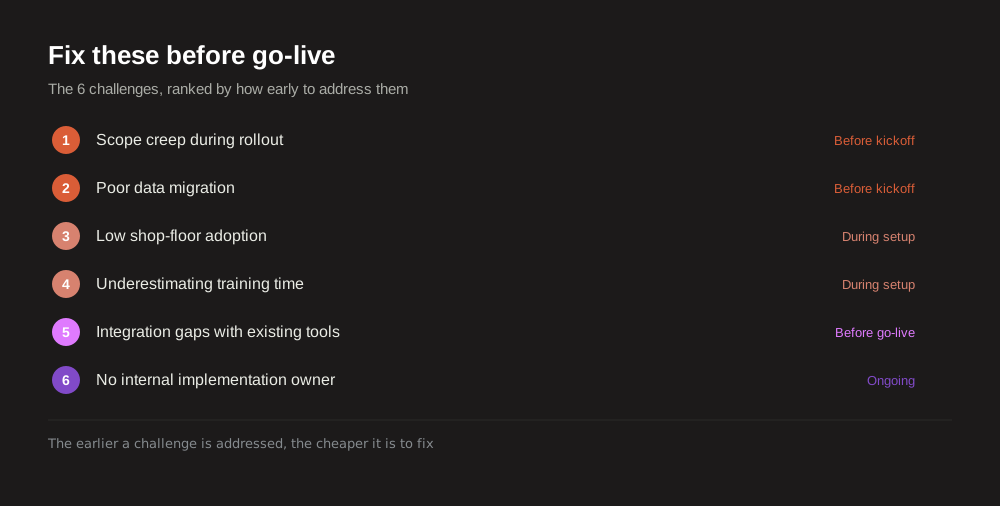
Where ERP Rollouts Break Down in Practice
The same patterns repeat across manufacturing SMEs implementing an ERP for the first time:
Buying before mapping the process. Software gets selected in a demo, then the team spends months trying to fit their actual workflow into it.
Migrating data without cleaning it first. Duplicate vendors, stale pricing, and inconsistent item codes carry every old error into the new system.
Skipping a parallel run. Cutting over in one day with no overlap period leaves no safety net when something does not match.
Training the wrong people. Managers get trained on reports while the operators who will actually enter data get a one-hour walkthrough.
Declaring victory at go-live. The real test is week eight, not day one, when the vendors onboarding team has moved on to the next client.
Still running your last ERP rollout on spreadsheets because the migration never actually finished?
TranZact migrates your item master and vendor data with dedicated onboarding support, so your first stock count on the new system actually matches what is on the shop floor.
See how TranZact onboarding works →
Where TranZact Fits for ERP Implementation
TranZact runs a guided data migration for your item master and vendor records, not a raw CSV import, before you go live. Work orders and BOMs are configured with your team during onboarding, not handed over as a blank template. Our companion piece on ERP implementation strategies covers the phased approach that pairs well with this.
TranZact cannot fix a rollout where no one internally owns adoption, that part is on your team regardless of which ERP you choose. What it can do is remove the data migration and configuration risk that causes most early failures.
FAQ
Why do most ERP implementations fail?
Most failures come from planning problems, not the software itself: poor data migration, low shop-floor adoption, unrealistic timelines, and no one internally accountable for the rollout after go-live.
How long should ERP implementation take for an SME manufacturer?
A manufacturing-first tool with dedicated onboarding support typically takes a few weeks. A full accounting ERP retrofitted for manufacturing can take several months, largely due to configuration and data cleanup.
What is the biggest risk during ERP data migration?
Carrying over dirty data. Duplicate vendors, inconsistent item codes, and stale pricing that were never cleaned in the old system will cause the same errors in the new one, just harder to trace.
How do you get shop-floor staff to actually use a new ERP?
Involve supervisors and operators in configuring the workflow before go-live, not just training them on the finished system. Adoption is highest when the people using it daily helped shape it.
Who should own an ERP implementation internally?
One person, not a committee. A vendor can run the technical rollout, but someone on your team needs to own adoption, track go-live milestones, and escalate issues in the weeks after launch.
Related Reading
Check out other blogs



Born in India. Building for the world.
Built by IIT & IIM founders
