FSN Analysis Explained
3 min read
By
TranZact Solutions Team
· Published


TL;DR: FSN analysis classifies inventory by movement frequency into Fast, Slow and Non-moving items. It is based on actual issue history, not value or price. A part that has not moved in eight months is telling you something a value-based classification like ABC will never show.
What Is FSN Analysis?
FSN analysis is an inventory classification technique that groups items into Fast-moving, Slow-moving, and Non-moving categories. It sorts them by how often and how recently they are issued.
Fast-moving items get issued regularly and need tight reorder monitoring to avoid stockouts. Slow-moving items move occasionally and tie up capital without matching genuine demand. Non-moving items haven’t been issued in a defined period and are the clearest candidates for write-off or disposal review.
The technique is primarily a dead-stock and working-capital tool. It does not measure cost or criticality on its own, which is why it is usually reviewed alongside ABC and VED rather than in isolation.
FSN vs ABC Analysis
Basis: FSN classifies by movement frequency and recency of issue; ABC classifies by consumption value (price times usage).
Goal: FSN identifies dead stock and working-capital risk; ABC identifies where cost-control effort pays off.
Overlap: an item can be A-category (high value) and Non-moving at the same time. That is the costliest combination: high-value cash sitting completely idle.
Best use: use FSN to catch dead stock before it becomes a write-off; use ABC to decide where tighter purchasing discipline matters financially.
Combined approach: cross-referencing FSN against ABC surfaces the highest-priority problem items first: high-value stock that has also stopped moving.
How to run an FSN review
Pull issue history for each item
Set non-moving windows by item type
Tag items Fast, Slow or Non-moving
Cross-check with ABC and VED
Feed results back to purchasing
How FSN Classification Works
Classifying an item under FSN comes down to its actual issue history:
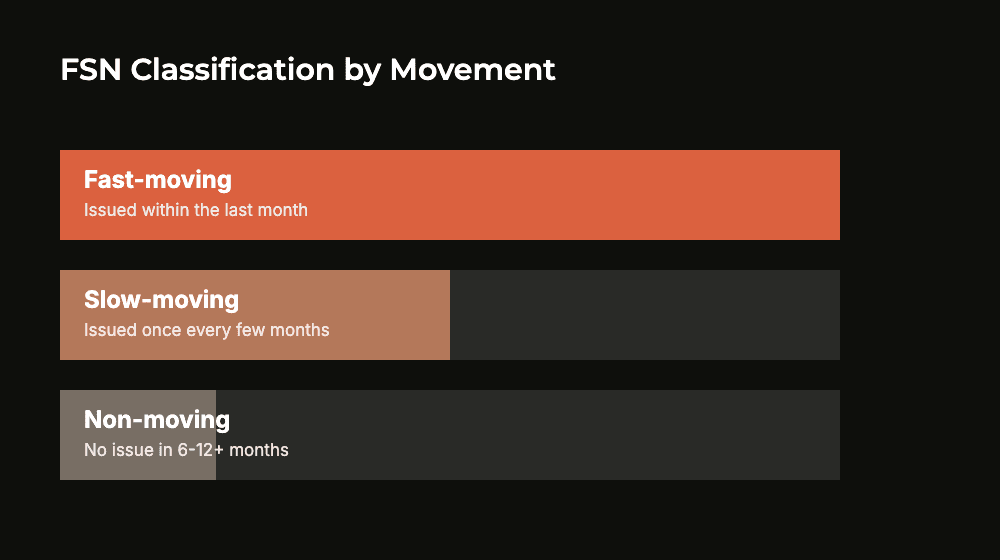
Fast-moving: issued frequently, usually within the last month. Needs close reorder monitoring, since a stockout hits production directly.
Slow-moving: issued occasionally, typically once every few months. Review whether current stock levels still match real demand.
Non-moving: no issue recorded in a defined window, commonly 6 to 12 months. Flag for write-off, disposal, or a check on whether it’s still needed.
Set the non-moving threshold deliberately. What counts as “non-moving” varies by industry and item type; a spare for critical, rarely-used equipment isn’t the same as dead raw material.
Common FSN Analysis Mistakes
Where FSN classification typically goes wrong:
Using a single threshold for every item type. A critical spare that hasn’t moved in a year isn’t the same problem as raw material with no matching order. The same non-moving label hides two different situations.
Only reviewing FSN during a year-end audit. Dead stock accumulates continuously; an annual check catches it eight to twelve months too late.
Writing off non-moving stock without checking criticality. A Vital spare under VED can also be Non-moving under FSN by design. It’s meant to sit unused until needed, not gather value as dead stock.
Ignoring seasonality. An item that moves only in one quarter can look Slow or Non-moving the rest of the year and get miscategorized as dead stock.
No feedback loop to purchasing. Flagging Non-moving stock is only useful if it actually changes what gets reordered; without that link, the same excess keeps getting topped up.
Do you know how much cash sits in stock that hasn’t moved in six months? Or would that take a manual count?
TranZact’s inventory management covers inventory ageing and valuation. So you know what’s dead stock without waiting for a year-end audit.
How TranZact Supports Inventory Prioritization
TranZact gives you the stock data an FSN review depends on.
Its inventory management includes inventory ageing and valuation, multi-store stock tracking and AI stock alerts. Inventory ageing and valuation is on the Scale and Dominate plans.
So you know what stock you hold, what it’s worth and what’s dead stock. Want to see it on your own items? Bring your item list to a demo.