← Back to All Blogs
Operations · 8 min read · Updated September 2026
Digital Documentation: 5 Key Benefits for SME Manufacturers

Digital documentation is the practice of creating, storing, and managing business records, quotations, invoices, purchase orders, and reports, electronically instead of on paper, and it gives an SME manufacturer faster access, better security, and a record that survives a lost file or a bad monsoon.
Most Indian SME manufacturers still run at least part of their paperwork on paper, and it works, until someone needs last month’s purchase order in the next five minutes and it is filed in the wrong folder in the wrong cabinet.
What Is Digital Documentation?
Digital documentation is any business record created, stored, and shared electronically rather than on paper, quotations, invoices, purchase orders, GST filings, and internal reports all count.
It differs from simply scanning a paper form. A scanned PDF is a picture of a document; real digital documentation is created, searchable, and structured digitally from the start, so fields like amount, date, and vendor can actually be searched and reported on.
Every manufacturer already produces some digital documents, an Excel invoice counts. The real question is how much of a factory’s paperwork still lives in a filing cabinet, and what that costs when someone needs it fast.
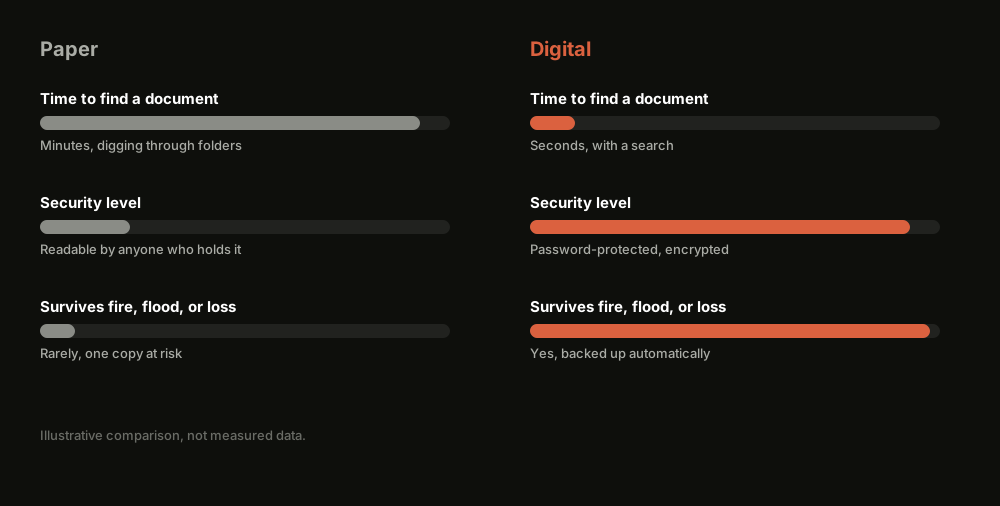
Paper Documentation vs Digital Documentation
5 Benefits of Digital Documentation at a Glance
Faster access. Find any document in seconds instead of digging through a filing cabinet.
Stronger security. Password protection and encryption beat a folder anyone can flip through.
Easier collaboration. Multiple people can view and update the same document without passing around paper.
Lower risk of loss. A fire, flood, or misplaced file cannot wipe out a cloud-backed record.
Audit and compliance ready. A timestamped digital trail is far easier to reconcile than a stack of paper at filing time.
Benefit
Paper Documentation
Digital Documentation
Speed of access
Search through folders and filing cabinets
Find and open a file in seconds
Security
Anyone with the physical file can read it
Password-protected and encrypted access
Collaboration
One copy, passed around or re-typed
Multiple people work on the same live file
Risk of loss
Destroyed by fire, flood, or simple misplacement
Backed up automatically in the cloud
Compliance readiness
Manually reconciled at filing time
Timestamped digital trail, always reconstructable
Where TranZact fits
Not applicable
Creates GST-compliant documents digitally across quotations, sales, purchase, and production
How to Move From Paper to Digital Documentation
Going digital does not have to mean a disruptive, all-at-once switch. Four practices make the transition stick.
Start with the documents you touch most often. Purchase orders, invoices, and stock records usually cause the most daily friction on paper, digitize those first.
Pick a system your team will actually use daily. A tool nobody opens is worse than the paper it was meant to replace.
Set access levels before you migrate. Decide who can view, edit, and approve each document type before old paper records get retired.
Keep a transition period, not a hard cutover. Running paper and digital side by side for a few weeks catches gaps before the paper trail disappears for good.
Where Digital Documentation Adoption Breaks Down
Going digital fails in a few predictable ways, and most of them are habits, not technology.
Old paper habits die hard. Staff quietly keep a parallel paper record because it feels safer, defeating the point of digitizing in the first place.
No consistent naming or filing structure. A digital mess is still a mess. Documents scattered across folders with inconsistent names are barely faster to find than paper.
Access controls too loose or too strict. Give everyone edit access and records get overwritten by mistake; lock it down too hard and people go back to email and WhatsApp.
Scanning without structuring. A folder of scanned PDFs is more searchable than a filing cabinet, but nowhere near as useful as structured digital records with real fields.
No backup discipline in the early months. A digital record that only lives on one laptop is one hard drive failure away from being worse than the paper it replaced.
Still hunting through a filing cabinet for last month’s purchase order?
TranZact creates GST-compliant quotations, sales, purchase, and production documents digitally, so your records are searchable and backed up instead of buried in a folder.
Digitize your documents with TranZact →
Where TranZact Fits for Digital Documentation
TranZact creates GST-compliant quotations, sales orders, purchase orders, and production documents digitally across your entire workflow, with access controls and a searchable, timestamped record for every document, replacing the filing cabinet with a live system.
It does not digitize records outside its own workflow, old HR files or legal contracts still need their own system. What it replaces is the paper trail for quotations, sales, purchase, inventory, and production, which is usually the bulk of an SME manufacturer’s daily paperwork.
FAQ
What is digital documentation?
Digital documentation is any business record, quotations, invoices, purchase orders, or reports, created, stored, and managed electronically instead of on paper.
What are the main benefits of digital documentation for SMEs?
Faster access, stronger security, easier collaboration, lower risk of loss, and audit-ready records are the five benefits that matter most for small manufacturers moving off paper.
Is digital documentation the same as scanning paper documents?
No. Scanning creates a digital image of a paper document, which is a start, but real digital documentation means the record is created, searchable, and structured digitally from the outset, not just photographed.
How secure is digital documentation compared to paper?
More secure in almost every practical case. Digital documents can be password-protected, encrypted, and access-controlled, while a paper file can be read, copied, or lost by anyone who physically holds it.
What is the first step to going digital with business documents?
Start with whichever paper document causes the most daily friction, usually purchase orders, invoices, or stock records, and digitize that one process before attempting a full switch-over.
Related Reading
Check out other blogs

EOQ (Economic Order Quantity): Meaning, Formula & Examples
8 min read
What Economic Order Quantity is, how to calculate it, and why the textbook formula breaks down for real manufacturing SMEs.
Read More

Holding Costs: Definition, Formula & How to Reduce Them
7 min read
What holding costs are, how to calculate them, and practical ways manufacturers reduce the cost of carrying inventory.
Read More

Direct Costs: Meaning, Examples & Formula for Manufacturers
7 min read
What direct costs are, how they differ from indirect costs, and how to track direct material and labor cost per job.
Read More

Born in India. Building for the world.
Built by IIT & IIM founders
