← Back to All Blogs
ERP Software · 8 min read · Updated Sep 2026
Benefits of Cloud ERP: 2025 Complete Guide for Indian SMEs

Cloud ERP is an ERP system hosted on the vendors servers and accessed through a browser, instead of installed on your own hardware. For an Indian manufacturing SME, the real benefits are lower upfront cost, faster implementation, and access from any location, not just a checkbox on a feature list.
This guide compares cloud ERP against on-premise ERP directly, covers what actually changes for a manufacturer, and is honest about where cloud ERP has real limits.
What Is Cloud ERP?
Cloud ERP stores and processes your data on the vendors servers rather than on a server in your own office. You access it through a browser or app, on any device with an internet connection, and the vendor handles the underlying infrastructure, updates, and backups.
On-premise ERP, by contrast, runs on hardware you own and maintain, usually in your own office or a data center you manage. It gives you more control over customization and data location, at the cost of upfront hardware spend and an internal IT function to keep it running.
Most Indian SME manufacturers are choosing between these two models today, not between ERP and no ERP. The right choice depends less on company size and more on how much IT capacity you actually have in-house.
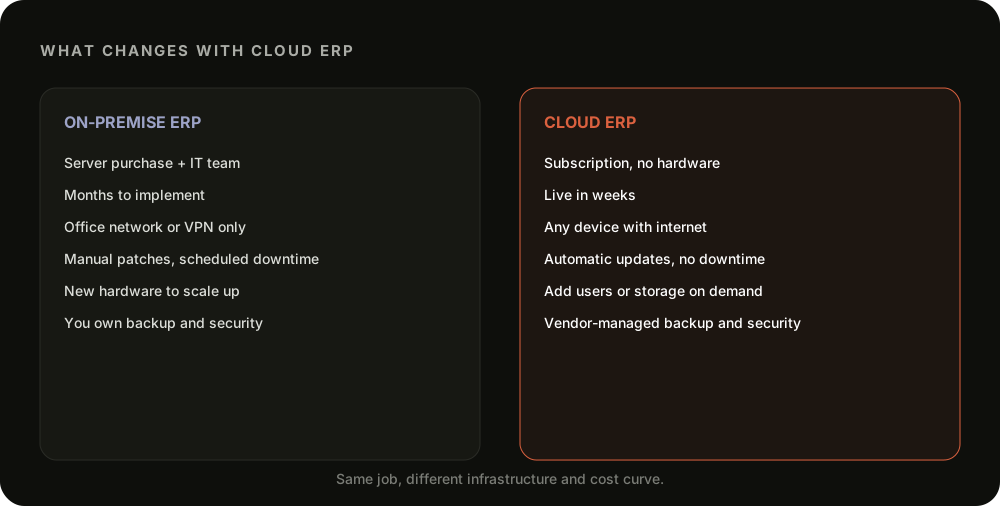
Cloud ERP vs On-Premise ERP, Side by Side
What Cloud ERP Gets You
Lower upfront cost. No servers to buy, no data center to rent, subscription pricing that scales with usage.
Faster time to live. Implementation is typically weeks, not the months a fresh on-premise rollout takes.
Work from anywhere. Anyone with a login and internet access can check stock, orders, or production from any location.
Automatic updates. New features and security patches roll out on the vendors schedule, without your IT team scheduling downtime.
Vendor-managed backups. Your data is backed up and encrypted by the vendors infrastructure team, not a single laptop or local server.
Aspect
On-Premise ERP
Cloud ERP
Upfront cost
Servers, licenses, and an IT team to maintain them
No hardware, subscription-based, updates handled by the vendor
Implementation time
Months of installation and configuration
Live in weeks, accessible from any browser
Access
Tied to the office network or a VPN
Any device with internet, useful across multiple locations
Updates and maintenance
Manual patches, scheduled downtime
Automatic rollouts, no downtime for the customer
Scalability
Adding users or modules means new hardware or licenses
Add users or storage on demand
Data security and backup
Your team owns backup and security entirely
Vendor-managed encryption and backups, shared responsibility
Hidden Costs of On-Premise ERP
The sticker price of an on-premise system rarely reflects what it actually costs to run over time.
No dedicated IT team, no cheap upgrades. Every version upgrade, security patch, or hardware failure becomes an internal fire drill instead of a vendors problem.
Multi-location access means a VPN, or nothing. On-premise systems built for a single office location add real complexity the moment you open a second warehouse or plant.
Backup and security become your responsibility. A single server failure or a missed backup can mean losing weeks of production and order data.
Scaling means buying more hardware. Adding users or a new module often means a fresh hardware purchase, not a plan upgrade.
What to Check Before Switching to Cloud ERP
A good cloud ERP evaluation goes beyond the demo. A few checks catch most of the problems that surface after go-live.
Check what happens without internet. A factory floor with patchy connectivity needs to know whether the system works offline at all, even briefly.
Ask where your data actually lives. Data residency matters for compliance and for how quickly you can export everything if you ever switch vendors.
Confirm the manufacturing-specific features exist. Many cloud ERPs are accounting-first, check for BOM, work orders, and batch tracking specifically, not just inventory counts.
Test the sync with your existing accounting software. A clean one-way sync to Tally or Zoho avoids double entry, a promised integration that is not live yet is a real risk.
Ask about the total cost at scale. Per-user pricing that looks affordable at 5 users can multiply fast at 25.
Still weighing a server purchase against a cloud subscription for your next ERP?
TranZact is cloud-based with real-time stock tracking built in, so you get live visibility across warehouses without buying a single server.
See Cloud-Based Stock Tracking in TranZact →
Where TranZact Fits as a Cloud ERP
TranZact is cloud-based, not a general-purpose ERP suite, what it gives you is real-time stock tracking across every warehouse, plus multi-level BOM, work order tracking, and GST e-invoicing accessible from any device, with no servers to maintain.
TranZact does not offer complex multi-entity accounting or deep HR modules, some full-suite cloud ERPs do. What it focuses on is the production and inventory side of a manufacturing SME, run entirely in the cloud.
FAQ
What is the difference between cloud ERP and on-premise ERP?
Cloud ERP is hosted on the vendors servers and accessed through a browser. On-premise ERP runs on hardware you own and maintain, usually in your own office.
Is cloud ERP cheaper than on-premise ERP?
Usually, yes, over time. There is no server purchase or in-house IT team required, though very high customization needs can add cost either way.
Is cloud ERP secure enough for manufacturing data?
For most SMEs, yes. Reputable cloud ERP vendors run encrypted storage and automated backups that are typically stronger than what a small in-house IT setup can maintain.
Can a manufacturer switch from on-premise to cloud ERP without disruption?
Mostly, with planning. Data migration and a parallel run for a few weeks are the two steps that prevent most go-live problems.
Is cloud ERP only for large companies?
No, the opposite. Cloud ERP removes the upfront hardware cost that made ERP hard to justify for smaller manufacturers in the first place.
Related Reading
Check out other blogs

EOQ (Economic Order Quantity)
6 min read
How to calculate the order quantity that minimizes total cost.
Read More

Holding Costs: Definition & Formula
6 min read
What it really costs to keep stock sitting in your warehouse.
Read More

Computerized Inventory System
9 min read
Advantages and disadvantages of digitizing your stock records.
Read More

Born in India. Building for the world.
Built by IIT & IIM founders
