← Back to All Blogs
Inventory Management · 9 min read · Updated September 2026
Computerized Inventory System: Advantages and Disadvantages

A computerized inventory system is software that tracks stock levels, locations, and movements digitally in real time, replacing manual registers and spreadsheets, so an Indian SME manufacturer always knows what is on hand without a physical recount.
Most factories still run some version of a manual system, a bound register or an Excel sheet, until stock volume or SKU count outgrows what one person can track accurately by hand.
What Is a Computerized Inventory System?
A computerized inventory system is software that records every stock movement digitally, in, out, and transfer, the moment it happens, and keeps a running, always-current count of what is on hand at every location.
It replaces the paper register or spreadsheet with a live database that updates automatically as goods move, so quantity-on-hand, reorder points, and stock value are always current instead of reconstructed from memory at month end.
Every manufacturer needs some system of record for inventory. The question is whether that record updates itself in real time or depends on someone writing it down correctly, every time, without fail.
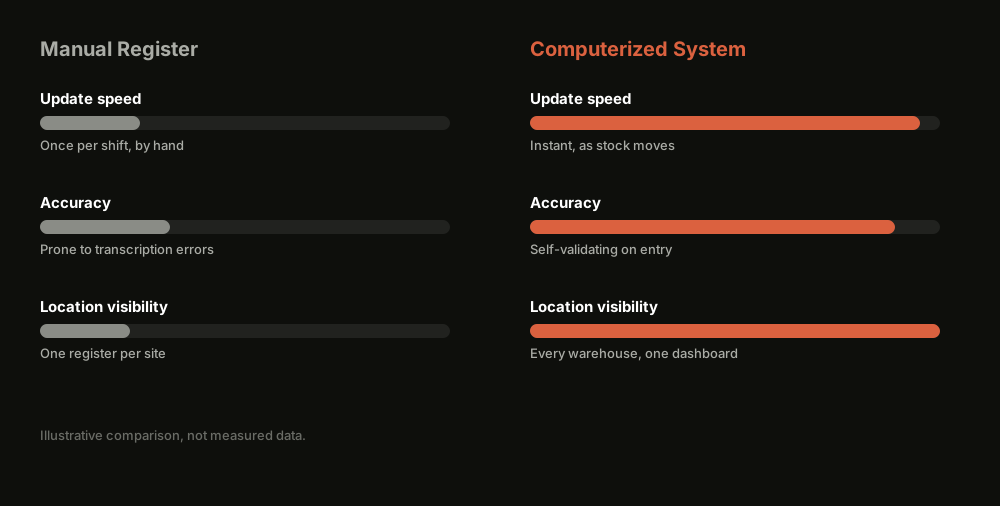
Manual Register vs Computerized Inventory System
Computerized Inventory at a Glance
Real-time stock counts. Every sale, purchase, and transfer updates quantity-on-hand instantly, no end-of-day reconciliation.
Fewer counting errors. Barcode or batch-based entry removes manual transcription mistakes from the record.
Automatic reorder alerts. The system flags low stock before it becomes a stockout, instead of relying on someone noticing an empty bin.
Multi-location visibility. One dashboard shows stock across every warehouse instead of a separate register per location.
Setup and training cost. Moving off paper takes an upfront investment in software and getting staff to actually use it.
Aspect
Manual / Register System
Computerized Inventory System
Update timing
End of shift or day, written by hand
Logged the instant stock moves
Accuracy risk
High, transcription and counting errors
Low, entries validate themselves
Multi-location view
Separate register per store or warehouse
One dashboard across every location
Reorder tracking
Manual calculation, easy to miss
Automatic low-stock alerts
Audit trail
Paper trail, easy to lose or backdate
Timestamped digital log
Where TranZact fits
Not applicable
Real-time, warehouse-wise stock tracking with batch tracking and automatic reorder alerts
Advantages of a Computerized Inventory System
Moving off paper changes more than how stock gets counted. Four advantages show up almost immediately.
Real-time accuracy. Stock counts reflect what actually happened on the floor a moment ago, not what someone wrote down at the end of a shift.
Faster, better-informed reordering. Automatic alerts flag low stock before it turns into a missed customer order, instead of a supervisor noticing an empty shelf.
Audit and compliance readiness. A timestamped digital trail is far easier to reconcile against GST returns than a stack of paper registers at filing time.
Lower long-run labor cost. Less time spent counting, reconciling, and re-entering data into a spreadsheet frees staff for work that actually needs a person.
Disadvantages and Risks of a Computerized Inventory System
A computerized system solves real problems, but it is not an install-and-forget fix. Five risks are worth planning for honestly.
Upfront setup cost. Software, hardware such as barcode scanners, and the time to load an accurate opening stock count all cost money before the system pays for itself.
Staff resistance and training gaps. A system is only as accurate as the data entered into it, and workers used to a paper register need real training, not a one-time walkthrough.
Garbage in, garbage out. If opening stock or BOM data is wrong at setup, every report downstream inherits that error until someone catches and fixes it.
Dependence on connectivity and power. A cloud-based system needs a stable internet connection and power at the point of entry, which is not guaranteed on every shop floor.
Over-reliance without spot checks. Teams sometimes stop doing physical counts entirely once software is in place, and a system nobody reconciles against physical stock can drift quietly out of sync.
Still reconciling a paper stock register at the end of every shift?
TranZact logs every stock movement the moment it happens, across every warehouse, so your inventory count is never more than a few seconds behind the shop floor.
See your live stock count in TranZact →
Where TranZact Fits for Computerized Inventory
TranZact tracks every stock movement in real time, warehouse-wise, with automatic reorder point alerts and batch tracking built in, so you get the core of a computerized inventory system without stitching one together yourself.
It is not a barcode-scanning hardware vendor or a standalone warehouse management system, it is the inventory layer of a broader production and purchase system, which is usually what an SME manufacturer actually needs instead of a point solution.
FAQ
What is a computerized inventory system?
A computerized inventory system is software that tracks stock levels, locations, and movements digitally and updates the record automatically as goods move, replacing manual registers or spreadsheets.
What are the main advantages of a computerized inventory system?
Real-time stock accuracy, fewer manual entry errors, automatic reorder alerts, and an audit-ready digital trail are the advantages that matter most for manufacturers.
What are the disadvantages of a computerized inventory system?
Upfront setup cost, the need for staff training, dependence on accurate initial data, and reliance on connectivity are the main risks, all manageable with a proper rollout.
Do small manufacturers really need a computerized inventory system?
Once you are tracking more than a handful of SKUs across more than one location, a manual register stops catching shortages and errors before they cost you an order, which is usually the point to move to software.
How is a computerized inventory system different from a barcode scanner?
A barcode scanner is one input method for capturing stock movement quickly and accurately. A computerized inventory system is the underlying software that stores, updates, and reports on that data, and barcoding makes it more accurate without being the system itself.
Related Reading
Check out other blogs

Consignment Inventory: How It Works, Pros, Cons, and When to Use It
8 min read
How consignment inventory differs from owned inventory, who bears the risk, and how to track consigned stock accurately without losing visibility.
Read More

Stock Discrepancy: Causes and How to Fix It
9 min read
What causes stock discrepancies in Indian manufacturing, how to catch them fast, and how to stop physical and system stock from drifting apart.
Read More

Inventory Write-Down vs Write-Off: What is the Difference
7 min read
How inventory write-downs work, how they differ from a write-off, and how to reduce the losses that force one in the first place.
Read More

Born in India. Building for the world.
Built by IIT & IIM founders
